Dit is deel 7 van onze serie over hoe Gylder werkt. In het vorige bericht behandelden we hoe je vermogensgeschiedenis wordt opgebouwd. Nu gaan we het hebben over hoe Gylder je op de hoogte houdt zonder dat je constant hoeft te checken.
Het probleem met handmatig checken
Je financiën bijhouden is alleen nuttig als je ook daadwerkelijk naar de data kijkt. Maar het leven is druk. Je vergeet een week te checken, dan een maand, en plotseling heb je een significante verandering gemist — een synchronisatie die is mislukt, een marktdaling of een mijlpaal die je zou willen vieren.
Gylder lost dit op met configureerbare meldingen die je waarschuwen wanneer er iets belangrijks gebeurt.
Wat je kunt monitoren
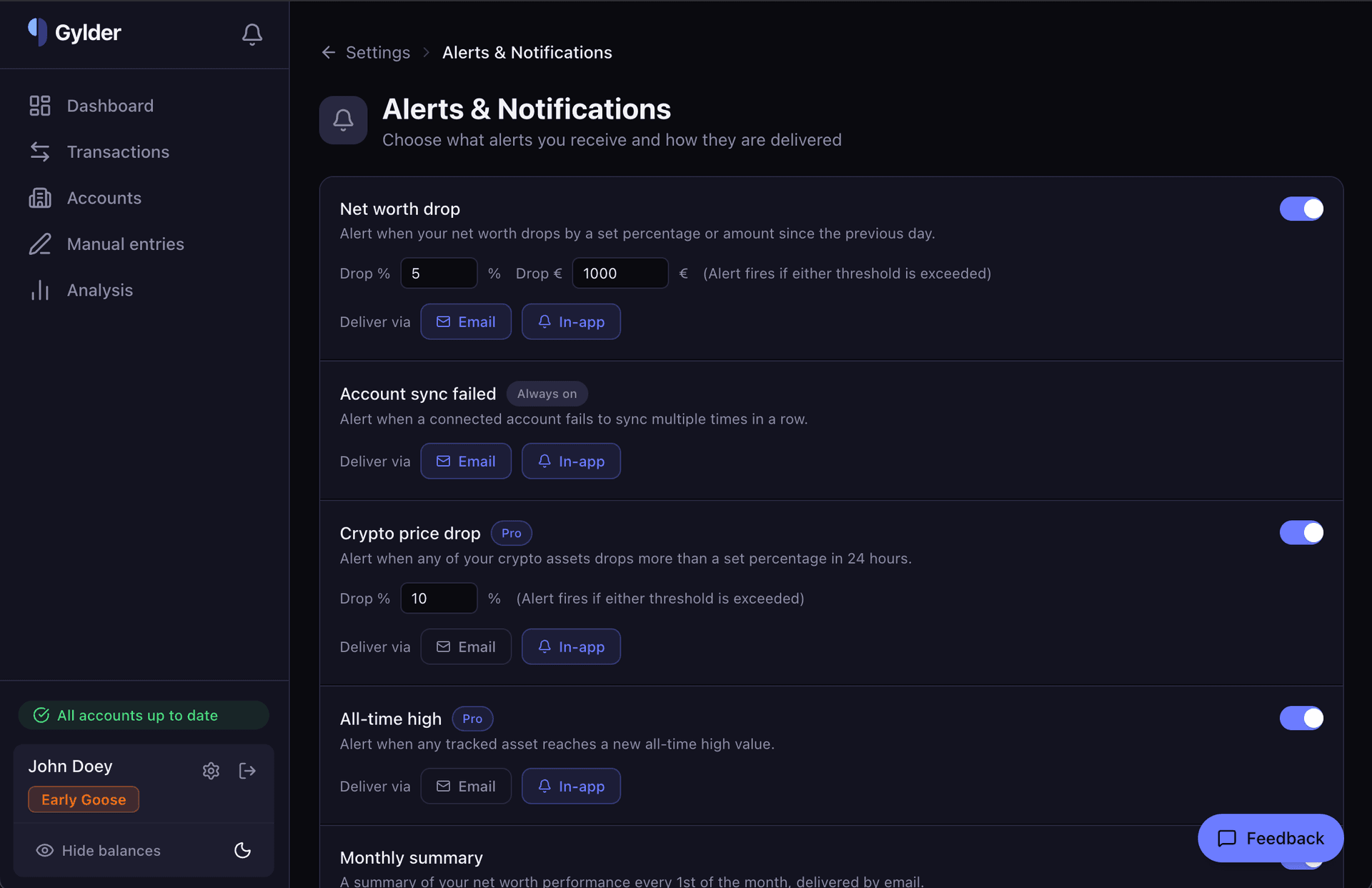
Vermogensdaling
Stel een percentage of eurobedrag in als drempel. Als je vermogen meer daalt dan je drempel vergeleken met de vorige dag, word je gewaarschuwd. Dit vangt plotselinge marktcrashes, onverwachte uitgaven of alles wat de naald significant beweegt.
Je bepaalt de gevoeligheid: een drempel van 5% houdt het rustig tijdens normale volatiliteit, terwijl een drempel van €1.000 grotere absolute veranderingen opvangt ongeacht het percentage.
Synchronisatie mislukt
Deze melding staat altijd aan — je kunt hem niet uitschakelen. Als een gekoppelde rekening meerdere keren achter elkaar niet synchroniseert, laat Gylder het je weten. Dit is belangrijk omdat een mislukte synchronisatie betekent dat je data veroudert, en je dat anders misschien niet zou merken.
Veelvoorkomende oorzaken zijn verlopen bankautorisaties (PSD2-koppelingen moeten periodiek opnieuw worden geautoriseerd) of ingetrokken API-sleutels.
Crypto-prijsdaling
Een Pro-functie die elk van je crypto-assets individueel monitort. Als een munt meer dan je ingestelde percentage daalt in 24 uur, word je gewaarschuwd. Handig voor volatiele markten waar een enkel asset dramatisch kan bewegen terwijl je totale vermogen nauwelijks verandert.
Record
Nog een Pro-functie. Wanneer een van je bijgehouden assets een nieuwe recordwaarde bereikt, viert Gylder dat met je mee. Het is een klein ding, maar het maakt het bijhouden leuker.
Maandelijks overzicht
Op de eerste van elke maand stuurt Gylder je een e-mail met een samenvatting van je vermogensprestaties over de afgelopen maand. Geen actie nodig — het arriveert gewoon in je inbox als een maandelijkse check-in.
Bezorgopties
Elke melding kan worden bezorgd via:
- E-mail — Verstuurd naar je geregistreerde e-mailadres
- In-app — Verschijnt als notificatie bij het belpictogram op je dashboard
Je kunt mixen. Vermogensdalingen per e-mail maar crypto-meldingen alleen in-app? Geen probleem.
Het notificatiebelpictogram
Het belpictogram in de bovenhoek van je dashboard toont een badge wanneer je ongelezen notificaties hebt. Tik erop om je meldingsgeschiedenis te zien — elke notificatie die Gylder heeft verstuurd, met tijdstempels en details.
Notificaties worden als gelezen gemarkeerd wanneer je de meldingenpagina bezoekt, waardoor de badge accuraat blijft zonder handmatig wegklikken.
Geïnformeerd, niet overweldigd
Het doel is niet om je te bombarderen met notificaties. Het is om de dingen te tonen die er werkelijk toe doen, zodat je je dashboard kunt checken wanneer er iets belangrijks gebeurt — en het kunt negeren wanneer alles in orde is.
De meeste dagen krijg je helemaal geen meldingen. En dat is precies hoe het hoort.