Dit is deel 3 van onze serie over hoe Gylder werkt. In het vorige bericht behandelden we bankkoppelingen. Nu gaan we het hebben over crypto.
Het crypto-trackingprobleem
Als je crypto op meerdere exchanges hebt, ken je de frustratie. Bitvavo toont je Bitvavo-bezittingen. Kraken toont je Kraken-bezittingen. Maar geen enkele app toont je totale cryptoportefeuille naast je banksaldi en beleggingen.
Gylder lost dit op door direct te verbinden met je exchange-accounts en alles in één overzicht te importeren.
Hoe exchange-koppelingen werken
In tegenstelling tot bankkoppelingen (die open banking gebruiken), gebruiken crypto-exchangekoppelingen API-sleutels. Dit is het proces:
- Log in op je exchange (Bitvavo, Kraken of Coinbase)
- Genereer een alleen-lezen API-sleutel — dit zorgt ervoor dat Gylder je gegevens kan bekijken maar nooit kan handelen of opnemen
- Plak de API-sleutel in Gylder
- Gylder importeert je volledige geschiedenis
De import is grondig. Bij de eerste koppeling haalt Gylder je volledige handelsgeschiedenis op — elke koop, verkoop, storting en opname. Dit geeft ons de data die we nodig hebben om je huidige bezittingen, historische prestaties en kostprijs te tonen.
Wat we importeren per exchange
Bitvavo: Volledige handelsgeschiedenis, stortingsgeschiedenis en opnamegeschiedenis. Bitvavo's API biedt uitgebreide data, waardoor het de meest complete integratie is.
Kraken: Volledige handelsgeschiedenis, stortingen en opnames. Kraken gebruikt een gepagineerd ledger-systeem, dus Gylder doorloopt de gehele geschiedenis om alles vast te leggen.
Coinbase: Handelstransacties (kopen en verkopen). Import van stortingen en opnames komt binnenkort — Coinbase's API vereist een andere authenticatiemethode voor die endpoints.
Hoe synchronisatie werkt
Na de eerste volledige import zijn synchronisaties incrementeel. Gylder checkt de timestamp van je meest recente transactie en haalt alleen nieuwe activiteit op sindsdien. Dit maakt volgende synchronisaties snel en efficiënt.
Synchronisaties gebeuren automatisch volgens een schema, of je kunt er handmatig een starten. De synchronisatielimiet voor crypto is 5 minuten — veel korter dan bij bankieren (dat beperkt is tot eens per uur vanwege PSD2-regelgeving).
Meerdere exchanges, één portefeuille
Als je crypto op twee of drie exchanges hebt, voegt Gylder alles samen in één overzicht. Je Bitcoin op Bitvavo en je Bitcoin op Kraken verschijnen als één gecombineerde BTC-bezitting — met een uitsplitsing die precies toont hoeveel er op elke exchange staat.
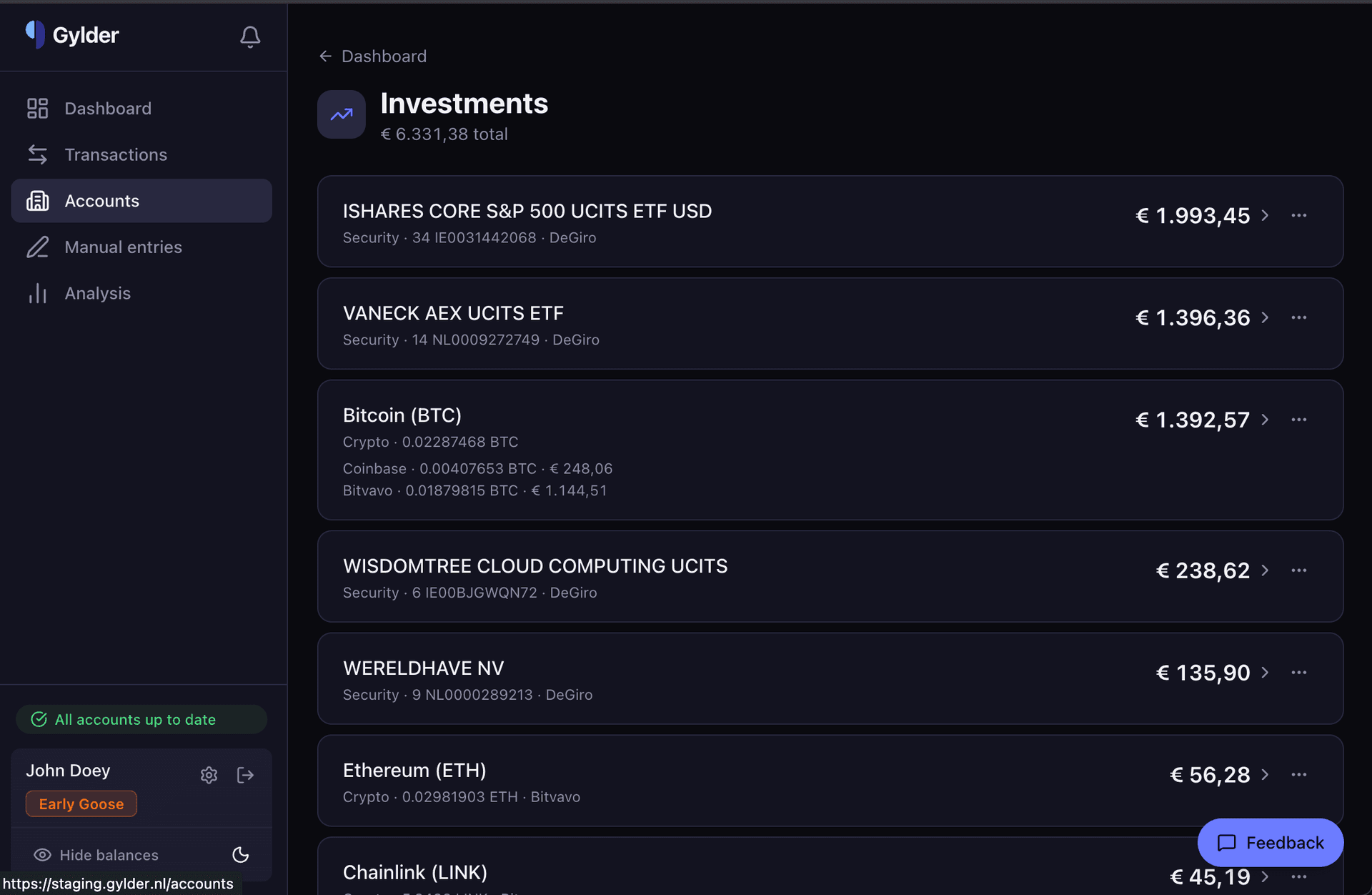
Dit uniforme overzicht strekt zich uit tot je hele dashboard. Je crypto staat naast je banksaldi, beleggingen en handmatige invoer — wat je een compleet beeld geeft van je vermogen.
Realtime prijzen
Cryptowaarden op je dashboard worden berekend met dagelijkse prijsdata die direct van de exchanges wordt opgehaald. Gylder haalt slotkoersen op van de publieke API's van Bitvavo, Kraken en Coinbase, zodat je portefeuillewaarde actueel blijft zonder handmatige invoer.
Voor historische data voeden dezelfde prijzen je vermogensgrafiek — wat betekent dat je kunt zien hoe je cryptobezittingen je vermogen beïnvloedden over tijd, niet alleen vandaag.
Beleggingen en crypto, zij aan zij
Als je ook een broker zoals DeGiro gebruikt, verschijnen je aandelen en ETF's direct naast je crypto. Het beleggingenoverzicht toont alles in één lijst — iShares ETF's naast Bitcoin, VanEck fondsen naast Ethereum — gesorteerd op waarde.
Dit is het uniforme overzicht dat geen enkele exchange of broker je kan geven: je volledige beleggingsportefeuille, ongeacht waar het wordt aangehouden.
Volgende: Vastgoed, auto's en andere bezittingen handmatig toevoegen →